Can you send crypto from Robinhood? Yes. Robinhood Crypto lets verified customers send supported coins to an outside wallet or exchange address, and transfers are available in every US state, plus Washington DC, Puerto Rico and the US Virgin Islands. You open the coin, tap Send, paste the receiving address, enter the amount and submit. Robinhood does not add a fee of its own, but every on-chain transfer pays a network fee, and a transfer cannot be canceled or reversed after you submit it. This guide covers the steps, the fees, the withdrawal limits, the time a transfer takes, supported coins and address formats, tax records and the reasons a withdrawal gets stuck. The figures were checked against the Robinhood help pages on 11 October 2026.
Key Takeaways
- You can move crypto out of Robinhood to any outside address that supports the same coin and the same network.
- You need identity verification first. Approval is usually quick but can take up to 5 business days.
- Robinhood charges no extra fee to send crypto. You pay the network fee, and Robinhood keeps no part of it.
- Withdrawal limits depend on your verification level and account history, and they cannot be raised by hand.
- Crypto that arrives in Robinhood has no cost basis until you add it, which matters at tax time.
Can You Send Crypto from Robinhood?
Yes, you can send crypto from Robinhood, and it works the same way in the app and on the website. Years ago withdrawals started as a limited beta for Bitcoin only, with a small daily cap and a waitlist. Today the Robinhood Crypto transfer feature supports many coins, and the official Robinhood crypto transfers page lists them with their networks.
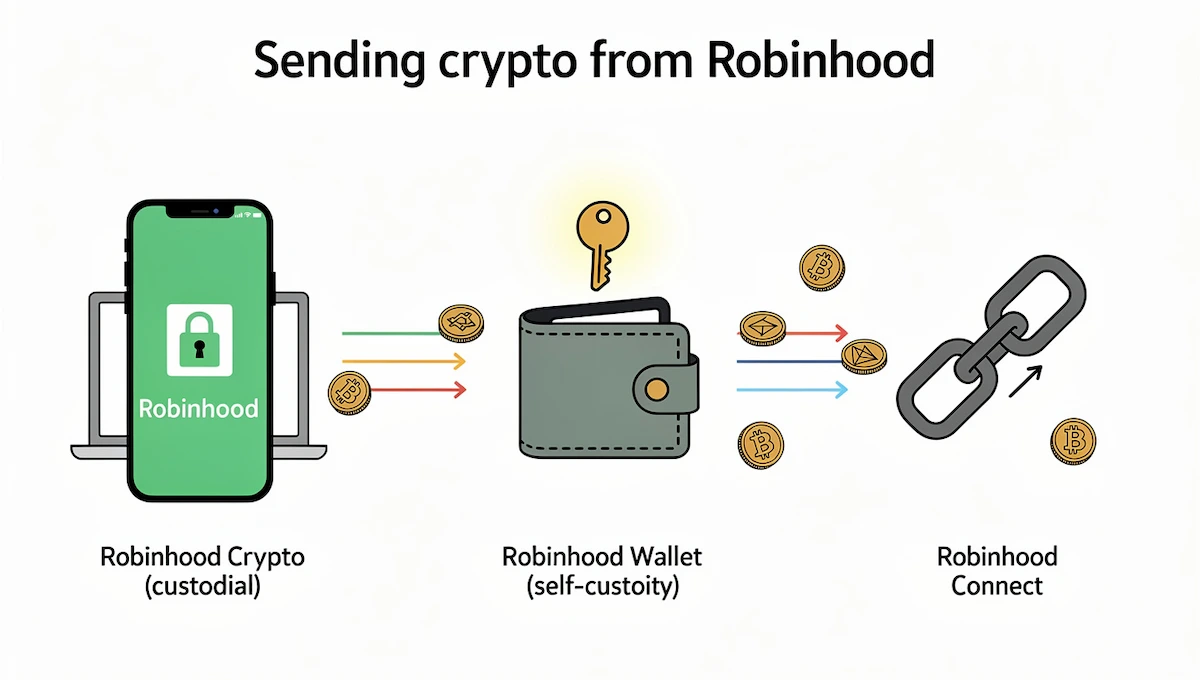
The first thing to know is that a Robinhood Crypto account is custodial. Robinhood holds the private keys, so a transfer moves coins out of that custody to an address you control or to another platform. If you want to withdraw crypto from Robinhood and hold it yourself, you need a wallet you set up and back up on your own.
Robinhood Crypto vs Robinhood Wallet vs Robinhood Connect
Robinhood uses three names that people mix up, and each one does a different job.
| Product | What it is | Who holds the keys |
|---|---|---|
| Robinhood Crypto | The brokerage account where you buy, sell, deposit and send crypto | Robinhood |
| Robinhood Wallet | A separate self-custody app, with swaps at 0.80% for same-chain and 0.73% for cross-chain | You |
| Robinhood Connect | A way to move crypto between your Robinhood account and wallets or dapps, with no Robinhood fee on crypto transfers | Depends on the wallet |
The steps in this guide apply to Robinhood Crypto. If you plan to keep coins in the self-custody app, you can send coins to your Robinhood Wallet address the same way you would send to any other wallet.
Who Can Send Crypto: Verification, 2FA and Location
To send crypto from Robinhood you first verify your identity. Robinhood says approval is usually quick, but it can take up to 5 business days. Some guides also list two-factor authentication as a requirement, and the Robinhood EU help page does require it, so turn it on before you start.
Availability follows location. In the US, transfers work in every state, but some coins are not available for trading in New York, and USDC is not available for trading in Texas. In the EU, Robinhood applies the Transfer of Funds Regulation, which means it may ask for sender or receiver details, and it states that deposits of 1,000 euros or more from an unhosted address you do not own cannot be accepted. EURC and USDC withdrawals were paused in the EU when this page was checked.
Before You Send Crypto Out of Robinhood
A transfer is final, so spend two minutes on this checklist before you tap Submit.
- Match the coin and the network. Each asset can only be sent on its own blockchain. Sending to the wrong network can mean a permanent loss.
- Copy the address from the receiving wallet. Use the Receive screen of the other wallet or exchange, not an old note or an old chat message.
- Check for a memo or tag. XRP, Stellar, Cosmos and Hedera need one. Without it the funds may not be credited.
- Check the balance that is free to move. Some funds are held until they settle, and the network fee comes on top of the amount.
- Send a small test transaction. Some guides suggest a test of 5 to 10 dollars, and the fee for a second transfer is a small price against a lost balance.
Never send crypto back to the sending address shown in a withdrawal on a block explorer. That address belongs to Robinhood and is not your deposit address, so coins sent there will not reach your account.
How to Send Crypto from Robinhood Step by Step
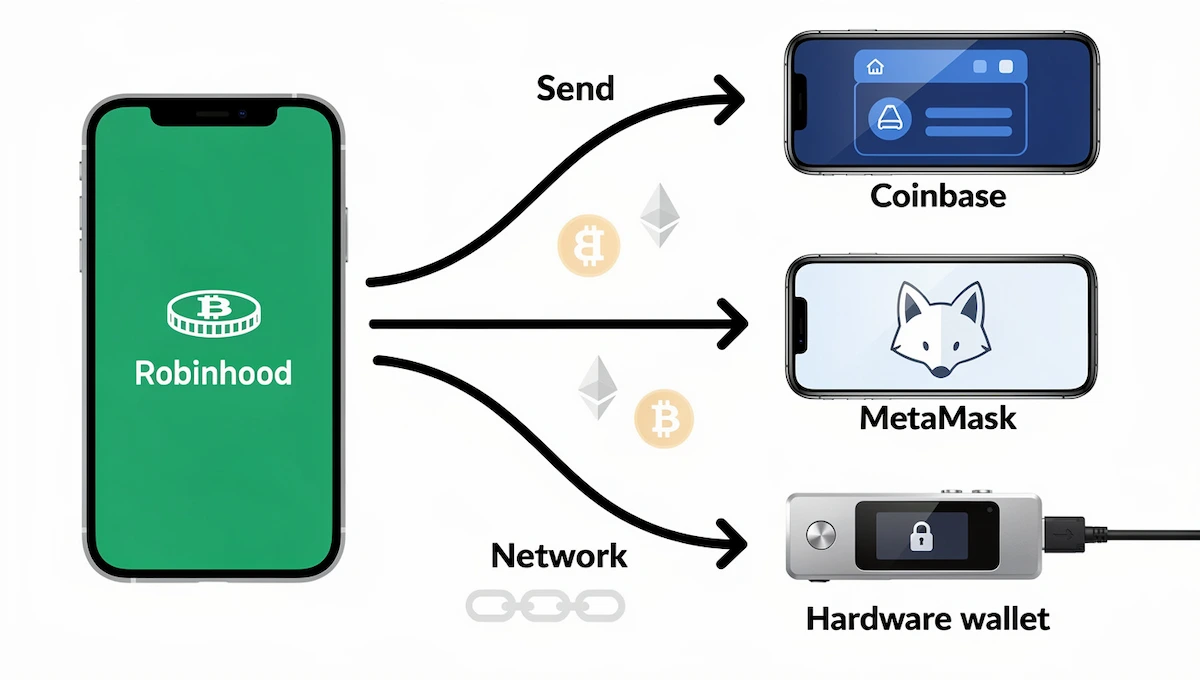
The steps are short, and the same flow works for every supported coin. The examples below show Coinbase, MetaMask and a hardware wallet as the destination.
How to Send Crypto from Robinhood on the App
- Open the app and go to the detail page of the coin you want to send.
- Tap Send.
- Paste the receiving address, or scan its QR code.
- Enter the amount. Choose Send All only if you want the network fee taken out of the amount.
- Tap Review and check the address, the network and the fee estimate.
- Tap Submit, then confirm with your biometrics or code if the app asks.
After you submit, Robinhood runs a security review that usually takes minutes. You can follow the transfer in your history and open the transaction ID in a block explorer.
How to Transfer Crypto from Robinhood to Coinbase
To transfer crypto from Robinhood to Coinbase, start on the Coinbase side. Open the asset, tap Receive, choose the same network you plan to use and copy the address. Then go to Robinhood, open the coin, tap Send, paste the Coinbase address and confirm the network matches. Coinbase does not charge to receive crypto, so you only pay the network fee.
How to Transfer Crypto from Robinhood to MetaMask or Another Wallet
For MetaMask, open the wallet, check which network is selected and choose the coin. Tap Receive, copy the address and paste it into the Send screen of Robinhood. A coin such as ETH needs the Ethereum network, and a Solana wallet needs a Solana address, so a wallet that only supports one network cannot take a coin from another one. Start with a small amount and confirm it before you move the rest.
How to Withdraw Crypto from Robinhood to a Hardware Wallet
If you want to withdraw crypto from Robinhood to a hardware wallet such as Ledger or Trezor, set up the device first and finish the recovery phrase backup. Copy the receiving address from the device or its app and verify it on the screen of the device itself. Then paste it into Robinhood, send a test amount, confirm it arrives and move the rest. A hardware wallet is a cold wallet, so the keys stay offline, and this is the step that gives you full self-custody.
How to Receive Crypto in Robinhood
To bring crypto into Robinhood, open the coin, tap Receive and copy the address. Each coin has its own deposit address, and for Bitcoin, Bitcoin Cash, Dogecoin and Litecoin the address changes with every deposit. Ethereum and ERC-20 tokens keep the same address. Deposits are not limited and receiving has no extra fee, but you must include the memo or tag when the coin asks for one.
Robinhood Crypto Withdrawal Fees
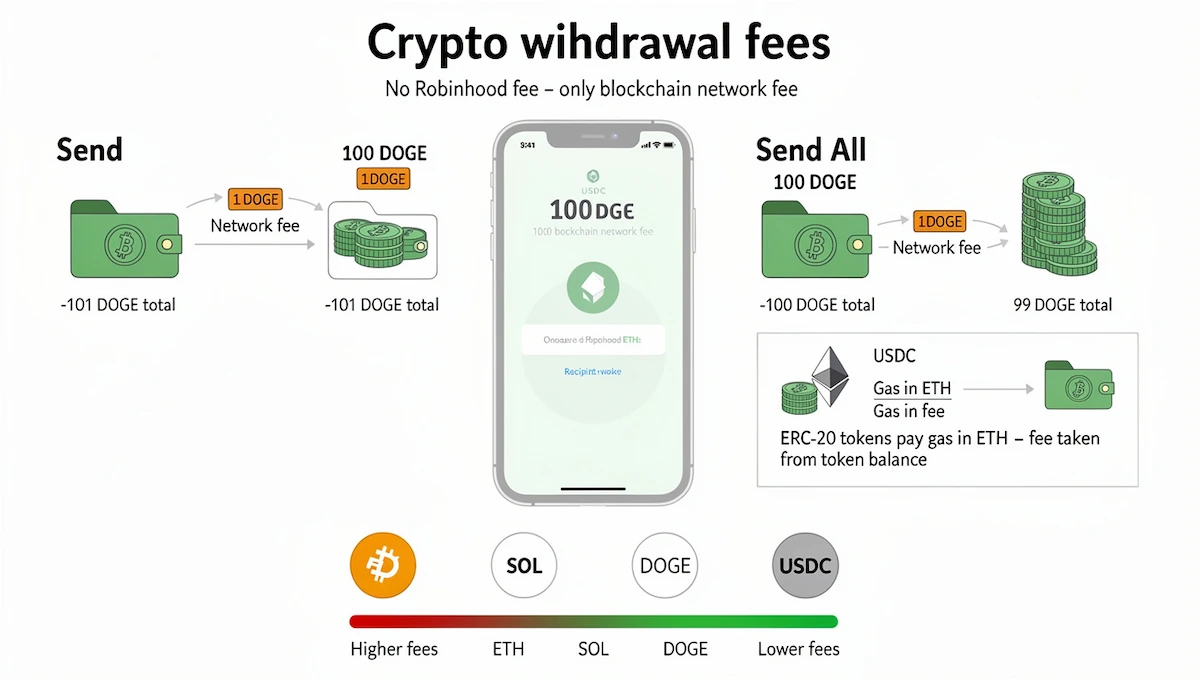
Robinhood does not charge a fee to send crypto, and it does not keep any part of the network fee. What you pay is the cost of the blockchain itself, shown as an estimate before you finalize the transfer.
Network Fee Explained: Send vs Send All
The network fee is paid to miners or validators, and it changes with the coin and with how busy the network is. A normal send adds the fee on top of the amount. If you send 100 DOGE and the fee is 1 DOGE, your balance drops by 101 DOGE and the receiver gets 100. With Send All the fee is taken out of the amount, so sending all 100 DOGE with a 1 DOGE fee means the receiver gets 99.
ERC-20 Tokens and the ETH Gas Fee
ERC-20 tokens such as USDC, LINK or UNI pay their gas in ETH. You do not need an ETH balance in Robinhood for this, because Robinhood works out the ETH equivalent and takes it from your token balance. The reverse does not work: you cannot pay a transfer fee from your ETH balance when you send a token.
What Network Fees Depend On
Fees rise when many people use the same blockchain at the same time. Bitcoin and Ethereum are usually the costly ones, while Solana and Dogecoin are usually cheap. Robinhood shows the estimate on the review screen, so you see the exact cost before you submit. If the fee looks too high for a small transfer, wait for a calmer period or choose a coin on a cheaper network.
Robinhood Crypto Withdrawal Limits
Robinhood does not publish one fixed dollar limit for every account. The help page says withdrawal limits depend on factors such as your verification level, your transaction history and your preferred payment methods, and that they can change.
Limits Table: Deposits, Withdrawals and Connect
| Type | Limit |
|---|---|
| Crypto deposits | Unlimited |
| Crypto withdrawals in Robinhood Crypto | Set per account, no fixed amount published, and they can change |
| Robinhood Connect crypto transfers | Up to 5,000 dollars worth of crypto or 10 transfers in 24 hours |
| Old beta withdrawals | 2,999 dollars of Bitcoin per day, up to 10 transactions, with two-factor authentication |
Many guides repeat the 5,000 dollar and 10 transfer figure as a general rule. The Robinhood Connect page publishes it for Connect transfers, so treat it as a Connect limit unless your app shows the same number for a normal withdrawal.
How to Check Your Limits
In the US app, open Account, then Menu, then Crypto to see your current limits. In the EU app, go to Account and then Transfer Crypto. Limits cannot be increased by request, because they come from your account activity.
Why You Cannot Withdraw All Your Crypto
When you try to withdraw crypto from Robinhood and the full balance is blocked, the usual reasons are a hold on crypto bought with ACATS bonus buying power, bank funds that have not cleared, a daily limit or the way the purchase was funded. Some guides say crypto bought with instant buying power cannot leave until it settles, which can take up to 5 business days. The balance is not lost in any of these cases, it only becomes available later.
How Long Does a Robinhood Crypto Transfer Take?
After you submit, Robinhood runs a security review that usually takes minutes, and then the transfer goes on the blockchain. The remaining time depends on the network and on the number of confirmations the receiving platform requires. Robinhood lists these confirmation counts for deposits into its own account, and they show how different coins behave.
| Coin | Confirmations | Approximate time |
|---|---|---|
| Bitcoin | 3 | about 1 hour |
| Litecoin | 12 | about 30 minutes |
| Dogecoin | 20 | about 20 minutes |
| Bitcoin Cash | 15 | about 3 hours |
| Ethereum and most ERC-20 tokens | 30 | about 5 minutes |
| Ethereum Classic | 1,200 | about 6 hours |
| Solana and most Solana tokens | 1 | under a second |
These are estimates and a busy network can make them longer. When you transfer crypto from Robinhood to another platform, that platform sets its own confirmation count, so a Bitcoin transfer to an exchange can take longer than the same amount of Solana.
Supported Coins, Networks and Address Formats
Robinhood supports a long list of coins, including Bitcoin, Ethereum, Solana, XRP, Dogecoin and USDC, and the list changes, so check the official page on the day you send. Only coins on that list can be sent, and sending an unsupported coin to a Robinhood address may mean a permanent loss. NFTs, airdrops and forks are not supported.
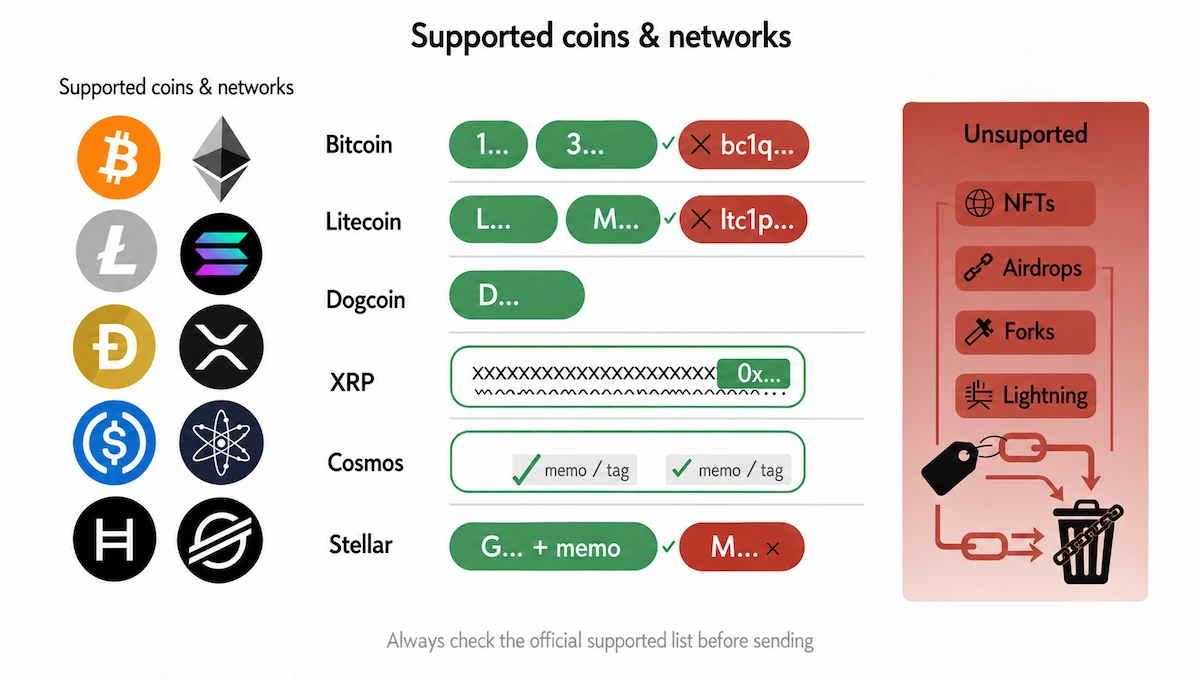
Address format is a common reason for a failed submission. An unsupported format makes the transaction fail before it is sent. The main rules are these:
- Bitcoin: addresses that start with 1, 3 or bc1q. Lightning and bc1p (taproot) addresses are not supported, and the guide on the Bitcoin Lightning Network shows why a Lightning invoice is a different thing from an on-chain address.
- Litecoin: L, M or ltc1. P2SH addresses that start with 3 are not supported.
- Dogecoin: addresses that start with D.
- Ethereum and ERC-20 tokens: standard 0x addresses.
- Solana: addresses of 44 characters.
- XRP: a numeric destination tag is needed to receive.
- Cosmos and Hedera: a memo is required. Stellar G addresses need a separate memo, and muxed M addresses are not supported.
Allowlisting and Other Security Settings
You can save addresses in Robinhood with a nickname for each coin, and the withdrawal screen shows your saved and recently used addresses. This saves time and lowers the risk of a copy error.
Allowlisting goes one step further. When it is on, you can only withdraw to approved addresses. A new address or a changed setting starts a 48 hour waiting period, and during that time new withdrawals are paused, although sends to addresses that were already approved still work. You turn it on in Account, Menu, Crypto, then Advanced security. It is a good setting for anyone who holds a large balance.
Why Your Robinhood Crypto Withdrawal Is Pending or Failed
A withdrawal that shows as pending is not always a problem. Check these causes in order.
- Security review: a new account or a large amount can take longer to clear, and verification itself can take up to 5 business days.
- Unsettled funds: crypto bought with funds that have not cleared, or with ACATS bonus buying power, may be held.
- Confirmations: the transfer left Robinhood, but the receiving platform waits for its confirmation count. Open the transaction ID in a block explorer to see where it is.
- Allowlisting hold: a new address in the 48 hour waiting period cannot receive yet.
- Missing memo or tag: the coins arrived, but the receiving platform cannot credit them without it.
- Wrong network or format: an unsupported address format fails at submission, and a wrong network can lose the funds.
If a transfer went to the wrong address, Robinhood cannot cancel or reverse it, because the blockchain does not allow it.
Common Mistakes When You Send Crypto from Robinhood
- Using the wrong network. A coin sent over a network the receiver does not support is usually lost.
- Skipping the test transaction. A small first send costs one extra fee and shows the whole route works.
- Pasting an old address. Copy a fresh address from the receiving wallet every time.
- Forgetting the memo. XRP, Stellar, Cosmos and Hedera need it.
- Using Send All without a plan. The fee comes out of the amount, so the receiver gets less than the balance you see.
- Sending to a Robinhood withdrawal address. Only the Receive address shown in your account is a deposit address.
Taxes and Cost Basis When You Move Crypto Off Robinhood
Robinhood does not say in its help pages whether sending crypto to another wallet is a taxable event, so ask a tax professional about your own case. What the help pages do cover is the paperwork. Crypto that you transfer into Robinhood arrives without a cost basis, because that information is not sent with a transfer. Until you add it by hand, lots with unknown or zero cost basis are closed first when you sell or withdraw, and Robinhood closes lots with the FIFO method.
Form 1099-DA reports sales and exchanges of digital assets that happened on or after 1 January 2025. For 2025 it sends gross proceeds to the IRS, and for 2026 it sends gross proceeds and cost basis. Keep a record of every transfer, with the date, the coin, the amount and the transaction ID. A business that receives crypto also needs these records, and the person who keeps the books, often an online business manager, will ask for them.
Do You Own Your Crypto on Robinhood?
In a Robinhood Crypto account you hold the right to the coins, but Robinhood holds the private keys. That is what custodial means. The coins are not covered by FDIC insurance or SIPC protection, and you can only use them through Robinhood while they stay there. The guide on the private key explains why whoever holds the key controls the coins.
A non-custodial wallet, such as Robinhood Wallet, MetaMask or a hardware wallet, gives you the keys. That means full control, and it also means nobody can recover the coins if you lose the recovery phrase. This is the main reason people choose to send coins to their own wallet.
When It Is Not Worth Sending Crypto Out
Moving crypto out is not always the best choice. A small balance can lose a big share to the network fee, especially on Bitcoin or Ethereum during a busy period. If you plan to sell soon, selling inside Robinhood avoids the fee and the extra risk of a copy error. If you only want to trade, there is little reason to move crypto from Robinhood at all.
Conclusion
You can send crypto from Robinhood to an outside wallet or exchange once your identity is verified, and the cost is the network fee, not a Robinhood fee. Match the coin and the network, copy a fresh address with any memo, send a small test and keep the transaction ID. Check your limits in Account, Menu, Crypto, and keep records of the cost basis for taxes.
Frequently Asked Questions
Can you send crypto from Robinhood to another wallet?
Yes. After identity verification you can send supported coins from Robinhood to any outside address on the same network. Open the coin, tap Send, paste the address, enter the amount and submit.
Is there a fee to send crypto out of Robinhood?
Robinhood adds no fee of its own. You pay the network fee, which depends on the coin and on how busy the network is, and Robinhood keeps none of it. The estimate shows before you submit.
How long does a Robinhood crypto transfer take?
The Robinhood security review usually takes minutes. After that the time depends on the network and on the confirmations the receiving platform needs, from under a second for Solana to about an hour for Bitcoin.
What is the Robinhood crypto withdrawal limit?
Robinhood does not publish one fixed amount. Limits depend on your verification level and history and can change. Robinhood Connect transfers have a published cap of 5,000 dollars worth of crypto or 10 transfers in 24 hours.
Can I send crypto to Coinbase from Robinhood?
Yes. Copy the Coinbase receiving address for the same coin and network, paste it in Robinhood and send. Coinbase does not charge to receive crypto, so you only pay the network fee.
Can you cancel a Robinhood crypto transfer?
No. Transfers are final and cannot be canceled or reversed, even by Robinhood. Check the address, the network and the memo before you submit.
What happens if I send crypto to the wrong address?
The coins are usually lost. The blockchain does not allow a reversal, and a wrong network or a missing memo can have the same result. Send a small test transaction first.
Which coins can I send from Robinhood?
Supported coins include Bitcoin, Ethereum, Solana, XRP, Dogecoin and USDC, among others. The list changes, so check the Robinhood crypto transfers page before you send. NFTs, airdrops and forks are not supported.
Is sending crypto from Robinhood to my own wallet taxable?
Robinhood does not say in its help pages, so ask a tax professional. Robinhood does state that transferred crypto has no cost basis until you add it, and that sales are reported on Form 1099-DA for activity from 1 January 2025.
Do I own my crypto on Robinhood?
Robinhood holds the private keys, so the account is custodial. To hold the keys yourself, send the coins to a non-custodial wallet such as Robinhood Wallet, MetaMask or a hardware wallet.
Can I send crypto out of Robinhood in the EU?
Yes, with identity verification and two-factor authentication, and activation can take up to 5 business days. Robinhood may ask for sender or receiver details under the Transfer of Funds Regulation, and some coins such as EURC and USDC had withdrawals paused at the time of checking.